
Fully compliant with ASME A17.1
Elevator Phone Monitoring That Always Answers
Request an elevator phone monitoring quote


U.S. Based Operators
Multilingual support
Code Compliant
Why wait! Get a fast online Quote Now!

Keep every elevator in your property connected to trained experts who know what to do in an emergency. MyLinkLine provides elevator phone monitoring that is reliable, code-compliant, and easy to manage across one building or an entire portfolio.
For more than 29 years, our trained operators have answered elevator calls around the clock, helping property managers, facility teams, and building owners protect tenants and guests while staying ahead of changing code requirements.
Request an elevator phone monitoring quote today or call 800-862-4001 to speak with a MyLinkLine life safety specialist.
Emergency elevator phones should be simple. Instead many describe:
Property and facility challenges
- Confusion about who actually answers elevator calls and what happens after a button press
- Inspectors citing elevators for phones that do not work or do not meet current communication requirements
- Tenants who get stuck, press the help button, and feel like no one is really there to help
- New rules about visual communication that are hard to interpret and even harder to test
Budget and risk concerns
- Expensive elevator phone landlines that keep going up every year
- Surprise fees from phone companies and vendors for service calls, reprogramming, or false alarms
- Worry about liability if someone with a hearing or speech impairment cannot get clear help during an entrapment
Property managers and facility leaders tell us they want one trusted partner for elevator phone monitoring and cellular lines instead of dealing with separate vendors, unclear responsibilities, and constant surprises.

Why properties choose MyLinkLine for elevator phone monitoring
One partner for monitoring and cellular lines
MyLinkLine installs and monitors elevator telephones and cellular lines nationwide. You can have a single point of contact for elevator phones, elevator phone monitoring, and cellular elevator phone lines instead of juggling multiple vendors.
Code focused from the start
MyLinkLine meets all applicable code requirements. Our monitoring verifies line status, routes calls correctly, and supports consistent response handling. We document tests, align procedures to inspection expectations, and help you keep elevator emergency communication ready across every location
Real people on every call
Our solutions are designed around current elevator communication requirements, including newer rules for visual messaging in elevators with in-car displays. You get an elevator phone monitoring plan that is built to support clear audio and visual assistance for passengers.
Clear location and callback information
Our systems identify the building, cab, and callback number so operators know exactly where the call is coming from. This is especially important if the caller is distressed, unable to speak clearly, or cannot communicate verbally.
Multilingual support
Calls can be handled in many languages so tenants and guests can communicate in a way that feels natural to them. This helps reduce confusion, speed up response, and make the experience less stressful for everyone involved.
Cellular ready for modern elevators
MyLinkLine cellular elevator phone lines are designed to work with all elevator telephones and monitoring services. They also support the communication needs of elevators with in car displays and visual indicators, helping buildings meet newer communication requirements without relying on aging landlines.
When you combine elevator phone monitoring with our cellular elevator phone line, many properties see meaningful savings of 35% or more compared to traditional landlines while also improving reliability and compliance.
3 Simple Steps | How MyLinkLine elevator phone monitoring works
MyLinkLine makes it easy to upgrade your elevator phone monitoring without disrupting tenants or elevator service. We follow a clear step-by-step process, so you always know what is happening and why.
1) Review your elevators and current setup
Fill out the online quote. We will then start with a quick discovery call to understand your properties and how each elevator is connected. We review cab counts, existing elevator phones, and which cabs use landlines, cellular, or a mix. We also flag code gaps, problem locations, and the best opportunities for savings so you can choose which elevators to move first.
2) Configure monitoring and notifications
Next, we set up your monitoring profile with building details, cab identifiers, and callback numbers so every call is clearly identified. We build your contact list with primary and backup numbers, then set the notification order for day and night. If your procedures change by business hours, weekends, or holidays, we document those instructions so responses match your process.
3) Connect telephones and cellular lines
Once setup is complete, your elevator contractor or our installation team connects each cab to MyLinkLine monitoring using your current phone lines or a MyLinkLine cellular elevator phone line. We coordinate scheduling with your staff and elevator company, and we label each cab clearly in our system. Then we place live test calls from every elevator for code compliance.
Get Quote
Get a quick quote and see how much your building can save.
Pricing and Packages
Simple elevator phone monitoring plans
Every building is different, but our approach stays the same. Keep pricing simple, avoid surprises, and build around your actual needs.
What you can expect
Straightforward per elevator monthly monitoring rates
Lower total cost when you bundle elevator phone monitoring with MyLinkLine cellular elevator phone lines
Options for additional support, such as testing guidance and documentation for your maintenance team
Savings with cellular elevator phone lines
By removing traditional elevator landlines and converting to our cellular elevator phone line, many properties reduce their total communication cost while improving reliability and compliance. You can choose to convert one building at a time or roll out a portfolio-wide plan.
First month monitoring promotion
Ask about current promotions for new elevator phone monitoring accounts. In many cases, new customers receive the first month of monitoring service at no charge for qualifying elevators.
Experience and Reliability
For more than 29 years, MyLinkLine has focused on emergency communication and elevator phone monitoring. Our monitoring center uses redundant computers, backup systems, and on-site generators to keep calls flowing even during power outages or unexpected failures.
Compliance-focused mindset
We sell and install equipment that is designed to follow federal, state, and local communication requirements. Our goal is to help you keep elevators open, protect passengers, and reduce exposure to avoidable communication and accessibility issues.
Do you have any questions? We’d love to hear from you!
1-800-862-4001
Elevator Video Monitoring Option
MyLinkLine’s Video Monitoring System modernizes elevator communication for both new and existing elevators, with accessibility, safety, and flexibility built in. It is fully compliant with ASME A17.1 requirements for 2019 and later and IBC requirements for 2018 and later, helping property managers, hotel owners, and building owners keep pace with evolving safety standards while strengthening passenger safety and maintaining code compliance.

Elevator Telephone Code and Testing for Compliance
The following elevator phone testing procedure listed below has been devised to assess the compliance of your existing emergency communication devices with the prescribed standard. Additionally, certain properties will need to adhere to the Americans with Disabilities Act (“ADA”) 4.10.14 code, which applies to elevators installed or substantially renovated on or after July 26, 1992. While it’s possible that your building(s) may be exempt from ASME regulations based on a grandfather clause, it’s important to note that states cannot grant exemptions from the federal ADA requirements, and failing to comply with these regulations can potentially expose your employer and building owner to avoidable legal liabilities.
It’s essential to note that when inspectors approve an elevator, their assessment does not guarantee full code compliance. In most cases, they focus on enforcing state or municipal codes and may not thoroughly check for Federal ADA requirements. The responsibility for adhering to code compliance rests with the management company and building owners.
How To Test Elevator Telephones
Option 1
Testing elevator phones without an in-car display*
Use this option for elevators that have a standard emergency phone without a built-in visual display in the car operating panel.
Step 1
Press the help button in the elevator
Confirm that the button is clearly labeled with the word HELP.
Press HELP and listen for the call to dial your elevator phone monitoring service.
Verify that the call connects to a live operator who answers as your monitoring center.
Step 2
Confirm visual call connected indication
Watch for the call connected light or similar indicator to turn on.
Confirm that the operator stays on the line and that passengers would clearly know that help has responded.
For passengers with hearing impairments, this visual cue is the main signal that someone has answered and is responding.
Step 3
Verify building and cab information
Ask the operator to read back the building name, address, and cab or car number that appears on their screen.
Make sure the information matches your records and is clear enough for dispatch or emergency responders.
Step 4
Test multiple elevators and concurrent calls
If you have more than one elevator, place calls from multiple cabs.
Confirm that the monitoring center can handle more than one elevator call at a time and can still identify each cab correctly.
Step 5
Set a regular testing routine
At a minimum, have your maintenance team test every elevator phone monthly or as required by your local authority.
Document test dates, results, and any corrective actions so you can show a clear record to inspectors and owners.
Option 2
Testing elevator phones with an in-car display*
Use this option for elevators that have a compliant emergency communication system with both audio and visual communication and an in-car display screen. These systems support live conversation and on-screen messaging so emergency personnel can communicate clearly with passengers who may not be able to hear or speak.
Step 1
Activate the emergency call
Press the dedicated HELP button on the car operating panel.
Confirm that the call connects to the elevator phone monitoring center and that you can hear the operator.
Check that any call connected indicator or message appears on the screen so passengers know the call went through.
Step 2
Verify two-way communication choices
Ask the operator to speak with you through the speaker and confirm audio is clear at a normal speaking voice.
If the system supports text-based messaging, ask the operator to send a test message and confirm that you can see it on the display.
Make sure the text on the screen is large enough and easy to read from inside the cab.
Step 3
Confirm visual messaging for passengers who cannot hear or speak
Ask the operator to send a simple message explaining that help has been contacted and is on the way.
Confirm that the message appears on the screen and remains long enough for a passenger to read.
Verify that the system provides a clear way for passengers to respond, such as using door open and door close buttons or other clearly labeled controls to answer yes or no questions if that feature is available.
Step 4
Check display visibility and lighting
Stand in different positions inside the cab and confirm that the screen is still readable.
Verify that cabin lighting is bright enough that passengers can see the display and any indicator lights.
If needed, work with your elevator contractor to adjust screen brightness or car lighting so messages remain easy to read.
Step 5
Confirm building and cab identification
Ask the operator to read back the building name, address, and cab identifier displayed on their screen.
Confirm that this information matches your records and would help responders locate the correct elevator quickly.
Step 6
Test under different conditions
Run at least one test with the elevator stopped at a different floor to confirm communication still works as expected.
If your system has backup power, coordinate with your elevator contractor to confirm that the communication system and display remain active during a simulated power loss.
Step 7
Document and repeat on a schedule
Record the date, time, and results of each test, including who performed it and any issues found.
Follow local requirements and your internal policy for test frequency, often monthly or more frequently for critical facilities.
Elevator Phone Monitoring Service Brochure

Elevator Telephone Testing Instructions Without Display
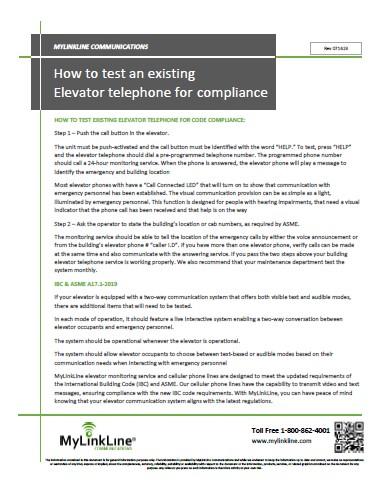
Elevator Telephone Testing Instructions With Display

Cellular Elevator
Phone Line
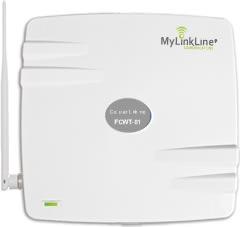
Get rid of the expense associated with conventional elevator phone landlines. Save 35% or even more every month by combining our elevator phone monitoring service with our reliable cellular phone lines!
Testimonials
Elevator Phone Monitoring Service
Thank you for your kind words. We understand the importance of providing exceptional elevator phone monitoring service to our valued customers. Your satisfaction is our top priority, and we remain dedicated to delivering high-quality and reliable solutions.
The elevator phone monitoring service exceeded my expectations. Prompt response times and clear communication ensured our tenants’ safety. I highly recommend MyLinkLine Communications!

I’m impressed with MyLinkLine’s elevator phone monitoring system. The easy-to-use interface and reliable connectivity offer peace of mind. Excellent customer support too!
MyLinkLine’s elevator phone monitoring solution is a game-changer. Quick emergency assistance and regular system checks guarantee reliability. An essential service for any building.
FAQ’s
Frequently asked questions about elevator phone monitoring
What is emergency phone monitoring and how does it work?
Emergency phone monitoring verifies the line stays ready and helps coordinate a response when an issue occurs. MyLinkLine provides cellular elevator phone lines and optional monitoring that support reliable emergency calling and response handling, with alerting and escalation when a phone or connection needs attention.
Can MyLinkLine monitor the elevator phones I already have?
Yes, we monitor Elevator Phones, Wheelchair Lifts Phones, Area of Refuge Phones, Parking Lot Phones, Campus Phones, Emergency Phones, Swimming Pool Phones, SOS Phones, Blue Light Phones, Call Box Phones, Intercom Phone Lines, Alarm Phone Lines.
Emergency phone monitoring provider, what should be included in the service?
Look for clear testing methods, timely alerts, defined escalation contacts, event documentation, service and support response times, and reporting you can use for compliance records. Providers should also support multi-site rollouts and make it easy to add, remove, or update contacts as buildings change.
Do you monitor other types of emergency phones?
Yes, we monitor Elevator Phones, Wheelchair Lifts Phones, Area of Refuge Phones, Parking Lot Phones, Campus Phones, Emergency Phones, Swimming Pool Phones, SOS Phones, Blue Light Phones, Call Box Phones, Intercom Phone Lines, Alarm Phone Lines.
How often should we test our elevator phones?
Most properties choose to test every elevator phone at least monthly, and some test more frequently based on occupancy type or local rules. Regular testing confirms that calls still reach the elevator phone monitoring center, that building and cab information is correct, and that visual communication features such as displays and indicators work as intended. MyLinkLine can provide a written testing procedure that your team can follow and keep on file for inspectors.
Why is elevator phone monitoring necessary?
Code regulations require that elevator telephones be connected to a monitored telephone number 24 hours a day. ADA compliance also mandates that telephone monitoring services must not rely on voice communication and must be capable of handling emergency calls from individuals with disabilities. Our state-of-the-art 24-hour monitoring service ensures the best emergency monitoring solutions available, with well-trained staff to assist in both emergency and non-emergency situations.
Can emergency telephones be programmed to call 911?
While emergency telephones may be programmed to dial 911 for emergency dispatch, it is generally discouraged. Most 911 dispatch centers prefer that emergency telephones do not tie up emergency lines with non-emergency or prank calls. Additionally, fines may be imposed for dispatching emergency personnel to non-emergency situations. Therefore, we do not recommend relying solely on 911 for answering emergency telephone calls.
Does your call center identify the location of emergency phone calls?
Yes, our call center’s computer system instantly identifies the phones and its location when an emergency call is received. This is particularly important for individuals who are deaf or unable to communicate verbally. Our monitoring service is designed to meet the requirements of the Americans with Disabilities Act (ADA), as well as ADA, ASME, and ANSI codes.
Can MyLinkLine monitor emergency and elevator phones purchased from another company?
Absolutely. We can monitor and reprogram elevator phones from any manufacturer, including those already built into existing car operating panels. No additional equipment is required for our monitoring services.
Do you charge additional fees based on the number of calls made from the cellular phone line?
No, we do not charge additional fees based on the number of calls made from an elevator phone line.
Call 800-862-4001 or send us a message, and a MyLinkLine specialist will help you review your current setup, identify any gaps, and outline a simple plan that fits your properties.
Other Useful MyLinkLine Resources
Elevator
Phone Monitoring
Elevator
Phone Testing
Elevator Phone
Code
Cellular Elevator Phone Lines for Elevator & Service Companies
Cellular Phone Lines for Property Managers
AT&T
FirstNet Solutions
Pool
Phone Lines
Elevator Cellular
Phone Line
Elevator Phone Monitoring
for Property Managers
Request
Quote
* The information contained in this website is for general information purposes only. The information is provided by MyLinkLine Communications and while we endeavor to keep the information up to date and correct, we make no representations or warranties of any kind, express or implied, about the completeness, accuracy, reliability, suitability or availability with respect to the document or the information, products, services, or related graphics contained in the document for any purpose. Any reliance you place on such information is therefore strictly at your own risk.
FIRST MONTH FREE!
Last chance to complete an online quote and we will give you the first month of monitoring service at no cost!
***This offer expires in 3 days***